

The example below shows the step to design pile cap for service load (unfactored load). It is also applicable in designing pad footing as the steps are similar.
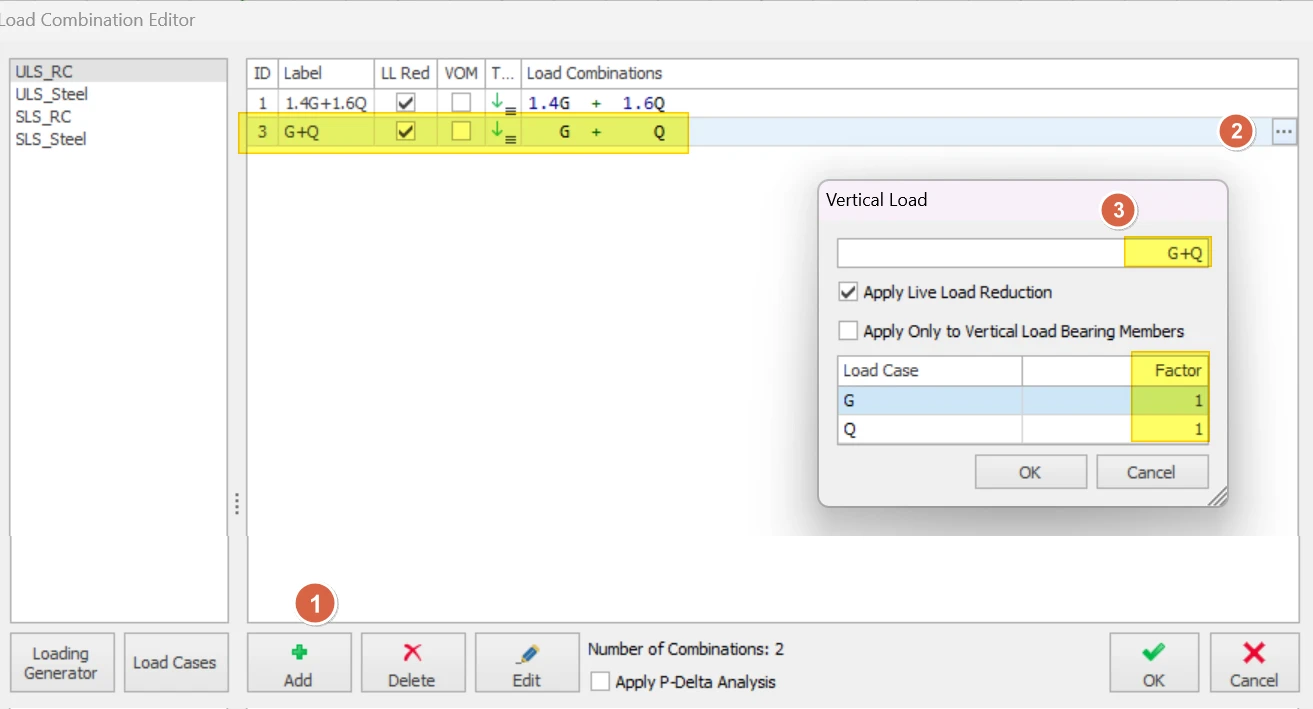
- First, manually create a unfactored load combination combination in Load Combination Editor dialog (example shown below)
- After running the Building Analysis, select a column in Storey 0 and click Insert Pile Cap.
- Go to Column Loads, deselect all Load Combinations and select the unfactored load combination. In this example, the combination no. for unfactored load combination is 2. Then, click Add Selected to User Loads.
- Click Design and OK.
- The pile cap will be inserted once the design is successful.

Caution when designing foundation to service / unfactored load
Modern code of practice such as EuroCode dictates that design of foundation should use all factored load combination, which is consistent for all members in the buildings. This is mainly due to the many different load factors applied to load cases, including seismic and wind load cases, forming a set of design load combinations, that must be used for all member design. Stripping all these factors to design foundation may lead to unconservative design, not to mention this method may not comply with the code.
Further, the design of reinforcements will only considered the selected unfactored load combination. This may not comply with code that requires rebars to be designed to factored load combinations.
As such, the above over-write method should be used with extreme caution & due diligence.