Web designing in a powerful way of just not an only professions. We have tendency to believe the idea that smart looking .

Community

Creating Points Psteel 2022

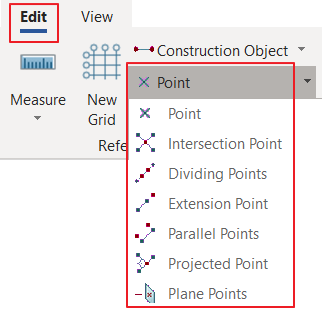
Overview Points are the primary snap objects in ProtaSteel. They are used for creating the geometry. Although points are created automatically at grid intersection points and at the ends of each frame element, sometimes it is necessary to create additional points to model complicated geometries. For this, the program provides a number of point creation […]

Modelling Detailing Overview

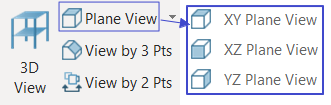
In Modelling & Detailing, there are several topics to be explain in detail here to allow users to have better understanding regarding the modelling technique and setting up different views/ workplane in ProtaSteel: Creating Points Creating Steel Elements Default Orientation Rules for Frame Elements Fast Point Entry Overview of Coordinate System Workplane Concept Profile Editor Setting […]

Creating Steel Elements

Steel Elements In ProtaSteel, you can only create joist, purlin, girt, stair member, plates, eaves beam & sag rods.  Main members such as beam, column & brace must be created in ProtaStructure.   Each type of element is defined with different command. These commands are accessible from the Steel Ribbon: Place the mouse cursor on the […]

Profile Database Editor

You can access the Database Editor from Tools ribbon > Databases > Profile Database Editor Database Profie Editor enables users to Create Profile – create an entirely new steel section profile Create/Edit/Delete/Search Family Edit/Delete/Search Profile Convert "I" profile to "T" profile Create Profile  Use this create an entirely new profile. The steps are as follows : Select Profile Type: choose Profile Type, i.e. I, […]

Geometry Tab In Profile Editor

Geometry tab is used for viewing/modifying the geometrical properties of the frame element such as the cross-sectional dimensions, profile type, orientation parameters or the length of the element (for columns only). Nodal connectivity information and element ID number is also displayed on this tab.  Descriptions of the controls and items on the tab are given […]

Fast Point Entry

Fast Entry is a mode of editing which can be enabled when necessary. Fast entry increases the point snap capabilities. When the Fast Entry Mode is enabled, you can snap to virtual snap points that are defined at a distance (as specified in the Fast Entry Details Dialog Box) from the real snap points (grid […]