Web designing in a powerful way of just not an only professions. We have tendency to believe the idea that smart looking .

Manuals Page

409 result(s) found

Frequently Asked Questions

Extract Column Wall Load Into Excel Format

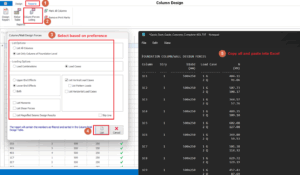
If you would like to generate the column/wall forces to excel format, please go to Design Tab > Columns > Reports > Columns forces listing, to generate the forces in notepad first. Then copy all the data into Excel and use the function "Text to Column" to split the text into multiple columns (refer to […]
Read More
Frequently Asked Questions

How To Remove Quantity Of Rebars In The Rebar Label

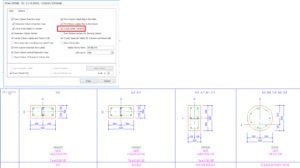
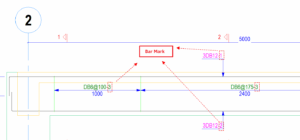
The number stated beside the rebar label is denoting the quantity of the rebars. The bar mark will be displayed on the rebar label in detail drawings when "Insert Quantity Table" option is checked. To remove it, just simply uncheck this option.

Read More
Frequently Asked Questions

Quantity Extraction Report

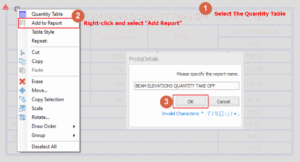
Generating quantity take-off report for Reinforcement The quantity table should first be inserted into the respective drawings by checking the “Insert Quantity Table” when generating drawings from the detail drawing manager. To generate the reinforcement quantity take-off report: Select the quantity take off table for the respective drawings. If you wish to generate multiple tables […]

Read More
Frequently Asked Questions

How To Model Roller Support

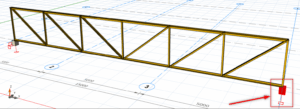
When modelling a truss in ProtaStructure, it must be supported by a column, wall or another beam. Hence, the supporting member must be modelled for the truss to sit on.  If you want to assign a special support, such as a roller support, it must be always be applied to the bottom of a column, […]

Read More
Frequently Asked Questions

3d Sway Effects Of Multi Storey Building

Many structures will undergo a natural sway under purely vertical (gravity) loads. These sways can sometimes introduce significant changes to the expected moment diagrams in beams. The axial force & moment of the columns and walls can also be significantly changed due to sway. In such cases it is important to ensure that checks are made […]

Read More
Frequently Asked Questions

How To Split Continuous Beams

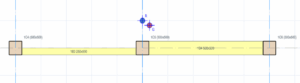
Beams which are created in a single axis will automatically become continuous beam in the beam design.  A simple example model is created as below :                                                            […]

Read More
Frequently Asked Questions

Automatic Column Schedule Grouping

General Column schedule grouping can be performed for columns with same size and reinforcement requirements. This will significantly reduce drafting requirements for large projects with repetitive column detailing.  Follow steps below to perform grouping in column schedule:- In Draw Details – Column Schedule, go to Options Tab and check option Group Similar Columns.  Click Draw  and pick an insertion point […]

Read More
Frequently Asked Questions

Adjust Text Height Of Dimension And Label

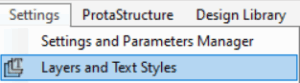
General Text height of dimensions (e.g. beam dimension, column dimension, etc) and labels (beam label, column label, etc) can be adjusted in ProtaDetails. Method 1 Adjusting Text Height in the Layers. Go to "Settings" > "Layers and Texts Style" Adjust the "Text Height (mm)" respectively based on the Description. Click "OK" Take note that "Text Height (mm)" has a maximum cap […]

Read More
Frequently Asked Questions

How To Model Curved Walls In Protastructure

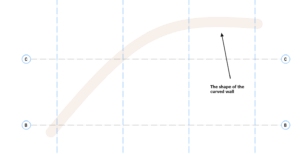
Curved Reinforced Concrete (RC) wall is currently beyond the scope of ProtaStructure. However, as a work around you can approximately model it as a series of segmented straight RC walls. Model the axes according to the angle of your curved wallIn this example, the shape of the curved wall is as shown below.  Now model […]

Read More
Frequently Asked Questions

Wall Braced Direction

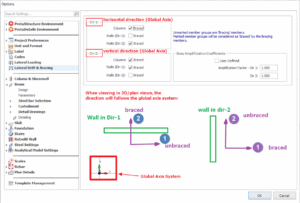
This article explains: the wall braced direction mentioned in Settings Center will be following the direction of the global axis system the wall braced direction mentioned in Section Design will be following the direction of the member local axis system Braced Direction In Settings Center In Settings Center > Lateral Drift & Bracing, the braced direction […]

Read More
Frequently Asked Questions

Draw Full Line Between Section Mark

General Section lines drawn in Form Plan layout and beam elevations can be shown in full line.  Navigation "Settings" > "Options" > "Other" Below images show the effect of the option

Read More
Frequently Asked Questions

3d Effects Of Continuous Primary Secondary Beams Analysis

Introduction Traditionally, continuous beam lines are analyzed and designed in isolation. The modelling of the support conditions in such cases is often unsophisticated or simplified. For example, in the analysis of secondary beams supported by primary beams, the traditional method is to perform two analyses independently and separately: Firstly, the secondary beam frame line is […]

Read More