Web designing in a powerful way of just not an only professions. We have tendency to believe the idea that smart looking .

Manuals Page

409 result(s) found

Building Analysis

What Is Merge Fe Column Beam Results With Example Ps 2022

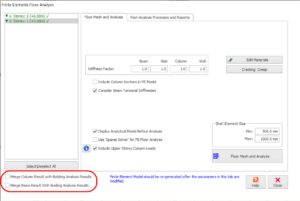
How to merge the results from sub-frame FE floor analysis and results from the 3D building analysis?   After a model is completed, a building analysis is mandatory which will generate results for G and Q (including the pattern cases of G and Q) as well as lateral load cases. This will be followed by FE […]

Read More
Building Analysis

Analysis Warning Diaphragm Notes Not In The Same Plane

If a warning appears during analysis, indicating that nodes constrained by a diaphragm do not lie in the same plane, it should not be ignored : Warning: [DIAPHRAGMS] Diaphragm Nodes not in the same Plane. Nodes in different planes are constrained to move together, undesirable effects may accrue… The warning message is triggered when various […]

Read More
Building Analysis

Reports Ps 2022

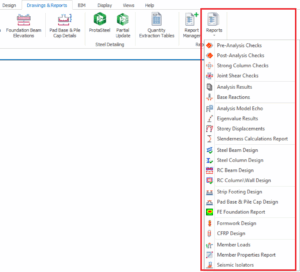
Various reports can be generated under " Drawings & Reports" tab. Pre-analysis Checks Report This report summarizes basic analysis model data such as storey heights, load combinations, materials and section properties. The member sections properties will only be included if the option to "Print Column, Wall & Beam Section Properties in Post-Analysis Report" is checked […]

Read More
Building Analysis

Diaphragm Modelling Example

In a typical building lateral resistance is provide at a few discrete points and it is assumed that applied lateral loads will be distributed to the lateral load resisting systems via floor diaphragm action. Within ProtaStructure diaphragm modelling is achieved using diaphragm constraints. A diaphragm constraint will maintain exact relative positioning of all nodes that […]

Read More
Building Analysis

Model Options

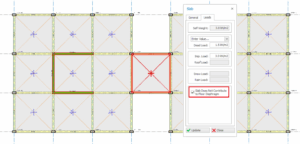
Options to be used in analysis can be specified in “Model Options” page of “Building Analysis” form. “Model Options” comprises of four tab pages namely, Model, Shear Wall Model, Slab Model, and Settings. Any modifications made in this page can be undone by pressing “Default Settings”. Model Parameters related with the analytical model of the building can be adjusted […]

Read More
Building Analysis

Post Analysis Ps 2022

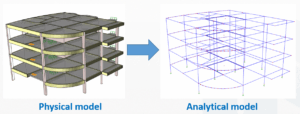
Physical Model vs Analytical Model  The 3D model you built is a physical model with actual member size rendered visually.  The analysis converts the physical model into the analytical model (as shown below).     The analytical model is essentially a centre-line wireframe model. For members to be connected properly, the analytical wire frame must meet a […]

Read More
Building Analysis

Sway Sensitivity Second Order Effects

Automatic Assessment of Sway Sensitivity Sway sensitivity is automatically determined in ProtaStructure when the design code is set to EC2. For other codes as discussed below, an assessment of sway sensitivity can also be made, however it should be noted that this is based on analytical results and the recommendations of the ACI code. Whenever sway sensitivity is assessed […]

Read More
Building Analysis

Rigid Links Auto Created To Support Offset Beams Supported By Columns

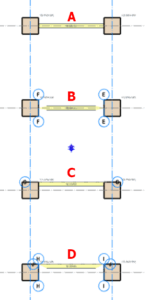
Introduction  During modelling structures, there may be situation where the beams insertion point is offset from columns insertion point.  In other words, the beam end node may not coincide exactly with the column node.  In ProtaStructure, as long as beams end node (insertion point) falls within the boundary of the column, rigid links will be […]

Read More
Building Analysis

Building Analysis Overview

Having modeled your structure and defined the parameters/loading to be applied, you are now ready to generate the member design forces. These are determined by performing a 3D analysis of the whole building. The pre and post analysis stages, along with the various applicable analysis options are fully described in the following sections: Model Options […]

Read More
Building Analysis

Column Outline Modelling For Flat Slab Models

For flat slab or transfer slab models, the slab will always be meshed to the perimeter outline of the column.  There are 2 options how the analytical outline is formed, which is available under Building Analysis dialog > Analysis Options > Settings tab :   1.  Use Finite Stiffness Rigid Links The rigid links can deflect […]

Read More
Building Analysis

Rigid Zone Interpretations

In order to consider concrete cracks that can be formed in the intersections, rigid zones may be reduced by a certain amount to calculate more realistic effects. ProtaStructure’s interpretation of rigid zones in member intersections can be summarized as follows: No Rigid zones (0%)  When no rigid zones option is requested, all analysis programs calculate and […]

Read More
Building Analysis

Difference Between Building Analysis And Fe Floor Analysis

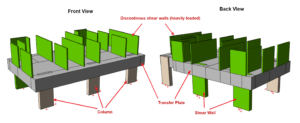
This article explains the differences between Building Analysis and FE Floor Analysis & which method is suited for different structural system. The fundamental differences of the analytical model created are shown in the below diagram.  For detail explanation of the entire modeling process refer to : Modelling, Analysis & Design Flowchart Building Analysis without floor slab […]

Read More