Web designing in a powerful way of just not an only professions. We have tendency to believe the idea that smart looking .

Manuals Page

409 result(s) found

Beam Section Design

Beam Section Design Overview

Beam design will be discussed here. Before that, please take note that Building Analysis must always be performed and completed without error (some warnings that create in purpose and do not affect the result can be ignored) and building behaviour must be checked and evaluated before proceeding to beam member design (Similarly to other member […]

Read More
Drawing Generation

Section Drawings

Plan Section In ProtaDetails, slab section can be generated via Plan Section. However, please note that ProtaDetails is reflecting the reinforcement information which transferred from ProtaStructure. Hence, design of slab must be done and the project model must be saved prior to creating Plan Section in ProtaDetails. For more details of slab analysis and design […]

Read More
Drawing Generation

Export Dwg Dxf

All intelligent objects will be converted to simple CAD entitles as a result of export operation. User can access to "Export DWG/DXF" via the "Detail" Treeview Context Menu". A dialogue will pops out and user can select drawing(s) in the drawing list that wish to be exported. Export Directory: Select a directory where the drawing should […]

Read More
Drawing Generation

Formwork Detail Drawings Ps2022

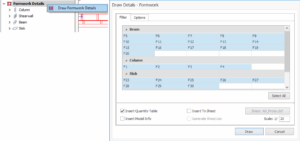
After designing the formworks in ProtaStructure, open ProtaDetails and start creating the drawings using the "Drawings Tree > Formworks". ProtaStructure automatically groups formworks. That means the detail drawings are also automatically grouped. Right-click on the "Formwork" node on the drawings tree and pick the "Draw Formwork Details" command. All details will be drawn and laid out […]

Read More
Drawing Generation

Form Plans

General Form Plans can be drawn for different scenarios. Unlimited numbers of form plans can be generated with different display options on the same or different drawings. Dialog is composed of 3 parts: Storeys : Select stories to be generated Detailing Options : Select the preferred options for each type of detail by highlighting them. Common Options […]

Read More
Drawing Generation

Drawings Generation Methods

ProtaStructure models drawings can be produced in 3 alternative ways.  Drawing must be created/opened before generating any detail drawing except for "Auto Generate Details (Detail Drawings Manager)" Auto Generate Details (Detail Drawings Manager) In Start Page, select the "Auto Generate Details (Detail Drawings Manager)" A new drawing will be automatically created and "Draw Details" dialogue will […]

Read More
Drawing Generation

Detail Drawing Manager

General Detail Drawing Manager (Draw Details) Dialog is the entry point to generate the detail drawings for selected stories with selected options. Dialog is composed of 4 parts: Storeys : Select stories to be generated Detailing Types : Select the types of the details to be drawn. Detailing Options : Select the preferred options for each […]

Read More
Drawing Generation

Pad Footing Details

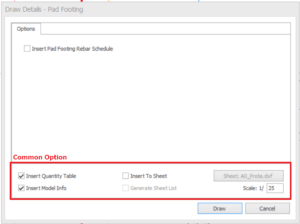
General Pad footing detail drawing can be drawn using "Pad Footing Details". Unlimited numbers of pad footing can be generated with different display options on the same or different drawings. The pad footing detail drawing is based on detail designed in ProtaStructure. Therefore, pad footings must be designed and saved before proceeding to ProtaDetails. Navigation […]

Read More
Drawing Generation

Drawing Generation Overview

Steps and basic guideline of generating drawing can be referred to ProtaDetail Basic Training Guide. The best practice is to complete the quick start guide before proceeding to this topic. In these articles will explain on the details of each drawing generation functions such as below: Drawings Generation Methods Detail Drawing Manager Form Plans Plan […]

Read More
Drawing Generation

Shearwall Elevation Drawings

General Shearwall elevation can be drawn using "Shearwall Elevation Drawings". Unlimited numbers of shearwall elevation drawing can be generated with different display options on the same or different drawings. Dialog is composed of 3 parts: Storeys : Select stories to be generated Detailing Options : Select the preferred options for each type of detail by highlighting them. Common […]

Read More
Drawing Generation

Pile Cap Details

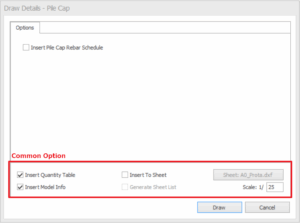
General Pile Cap detail drawing can be drawn using "Pile Cap Details". Unlimited numbers of pile cap can be generated with different display options on the same or different drawings. The pile cap detail drawing is based on detail designed in ProtaStructure. Therefore, pile caps must be designed and saved before proceeding to ProtaDetails. Navigation […]

Read More
Drawing Generation

Beam Elevation Drawings Faq Example

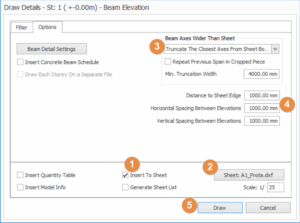
Several questions that users frequently asked and faced when generating Beam Elevation Drawings. Please find below for the example. Auto Truncation of Beam Elevation Details Long beam elevations can be automatically truncated to fit in any sheet border. This translates to significant increase in productivity as these time-consuming editing is no longer required.  To use […]

Read More