Web designing in a powerful way of just not an only professions. We have tendency to believe the idea that smart looking .

Manuals Page

409 result(s) found

Product Launch & New Features

Protastructure 2021 Global Launch

ProtaStructure 2021 – Be the First to Experience the Extraordinary Watch the Global Launch of our Revolutionary ProtaStructure 2021. In 2021, Prota again revolutionizes the engineering industry with; – A software for streamlined building modelling and analysis, – A software for designing your steel connections, concrete beams, core walls, foundations and more, – A CAD […]

Read More
Product Launch & New Features

Essential New Features Powerful Tips And Tricks Of Protastructure Suite 2022

ProtaStructure Suite is more robust and faster than ever! In this video, you will discover Prota’s innovations in 3D modeling, automated steel, and concrete building design, intelligent reinforcement, steel detailing, and BIM technology advancements for coordination, fabrication and construction.  The outline of this webinar consists of the listed tools and capabilities of the new version: […]

Read More
Product Launch & New Features

What S New With The Protastructure Suite 2026

As Prota, we have been developing leading structural BIM software for over 40 years. Priority on our product strategy has always been: Providing new practical modeling approaches Introducing innovative design technologies that will add value to your business and extend your toolset in your daily engineering practice. To improve the existing functionalities To introduce more […]

Read More
Product Launch & New Features

Protastructure 2022 Global Launch

The new version of ProtaStructure Suite, user-friendly software that provides all the tools needed for building modeling, analysis, and design, is available. ​ With ProtaStructure Suite 2022, our users will have access to a more robust, and more affordable structural engineering software packed with a lot of new features: Significant enhancements to seismic capabilities, including […]

Read More
Loading & Analysis

How To Manage Loads On Your Models With Protastructure Suite 2022

Loading framework of ProtaStructure is a flexible tool enabling users to easily manage loads acting on members and stories. This tool accelerates the processes of defining loads and load orientations, assigning load cases, reporting loads, and visualizing loads.  This webinar helps you explore the loading framework of ProtaStructure with all its components. The scope of […]

Read More
Guías de Entrenamiento Básico

Seminario Entrenamiento Protastructure Suite 2025

El software de ingeniería estructural todo en uno ahora es más sólido y mejor. ProtaStructure Suite 2025 incluye cientos de nuevas funciones. Su cobertura de código es aún más completa, el módulo de análisis es aún más sólido, el editor de combinación de cargas es aún más fácil de usar y entregar proyectos exitosos con […]

Read More
FE Analysis of Floors

Finite Elements Floor Analysis Ps2022

Background  With FE Floor Analysis, you can analyze and design floors under vertical loads only independently from the global 3D building analysis.  In this approach, the floor is isolated from the building and only gravity and imposed loads are applied. This allows engineers to simulate design scenarios where vertical loads govern. When conduct a “FE […]

Read More
FE Analysis of Floors

Column Wall Model Types Stiffness Factors Cracking And Creep

Stiffness Factors Introduction Beam, Slab, Column and Wall stiffness factors can be set automatically to make an allowance for cracking and creep.  An automated calculation is provided for this purpose as explained below, Cracking & Creep Calculator Alternatively the stiffness factors can be defined individually if required for maximum flexibility. Users are also advised to […]

Read More
Drafting With Rebar Object

Editing Rebar Segments

You can edit the segments of any existing rebar in ProtaDetails. Segment lengths can be changed. You can choose to shorten the segment by concrete cover amount or you can explicitly specify a value New segments can be added using existing boundaries.  To edit a rebar: Select the rebar and choose Right Click > Edit. "Insert Rebar" […]

Read More
Auto Connection Detailing

Steel Connection Scope And Assumptions

Once we have finalized position of the steel members, we can start “connecting” the steel members, i.e. create connections.  Connection can be created in two ways: Automatically using the connection macros from Macro Gallery or IntelliConnect Manually by using the Plates, Bolts, Welds & Cuts commands The automatic connection macros will automatically create the appropriate […]

Read More
Auto Connection Detailing

Stiffened Web Opening Macro Example Psteel 2022

In ProtaSteel, "Stiffened Web Opening Macro" create an opening on the web of the profile. Placing the mouse cursor over the  "Stiffened Web Opening Macro"  under "Detailing" section in Macro Gallery will reveal the tooltip describing the scope and steps of this macro.  There are 3 different hole type: Circular hole, Rectangular hole Hexagonal hole  Stiffener plates are created around […]

Read More
Auto Connection Detailing

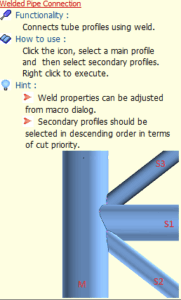
Welded Pipe Connection Macro Example Psteel 2022

Welded Pipe Connection Macro creates weld to connect tube profiles. Placing the mouse cursor over the Welded Pipe Connection Macro will reveal the tooltip describing the scope and steps of this macro. The below is the example as described in  ProtaSteel Quick Start Guide : Users can set 3D view model to wireframe under View tab […]

Read More