Web designing in a powerful way of just not an only professions. We have tendency to believe the idea that smart looking .

Manuals Page

409 result(s) found

Pre-Analysis

Seismic Analysis To Philippines Nscp2015

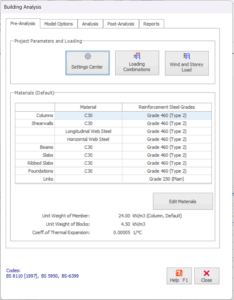
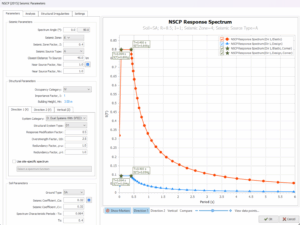
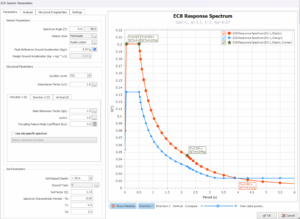
ProtaStructure can calculate seismic loads in accordance with Philippines (NSCP2015) seismic code, which is an adaptation of UBC97. Go to Building Analysis dialog > Pre-analysis tab :  Click on Settings Center > Code section will be shown > Pick Earthquake Code    Click Seismic Parameter to access the Seismic Parameters & settings Click the i  icon for more information […]
Read More
Pre-Analysis

Seismic Analysis To Eurocode 8

ProtaStructure can now calculate seismic loads in accordance EuroCode 8.  Country specific requirements of the following National Annex have been implemented : MS EN 1998-1 : 2015 (Malaysia National Annex) SS EN 1998-1 : 2013 (Singapore National Annex) Go to Building Analysis dialog > Pre-analysis tab :  Click on Settings Center > Code section will be shown > Pick Earthquake Code    Click Seismic Parameter to access […]

Read More
Pre-Analysis

Wind And Storey Loads 31 3 2022

Lateral loads can be applied at each floor level of the analysis model, or individual Column/Wall nodes (Joint loads that can be assigned to individual columns/walls are not limited only to lateral loads). You can use the “Wind and Storey Load” to define horizontal loads applied at each floor level. For example, if the wind […]

Read More
Pre-Analysis

Material

Pre-Analysis Tab Concrete and steel grades are assigned to each member type from the “ Pre-Analysis ” tab page in the “ Building Analysis ” Form. Unit Weight of Member Unit Weight of Concrete given in this field is used for calculating the self-weight of columns, walls, beams, slabs and foundations. Unit Weight of Blocks Unit Weight of Blocks is […]

Read More
Pre-Analysis

Seismic Load Basic Guide

General You will learn how to incorporate the basic seismic loading into your model. You will know how to view & check the seismic mode shapes It is very important that the user to refer the relevant earthquake code for detail explanations of the seismic analysis and design.  This article uses EuroCode 8 for illustration. The […]

Read More
Pre-Analysis

Notional Load And Input 23 11 2021

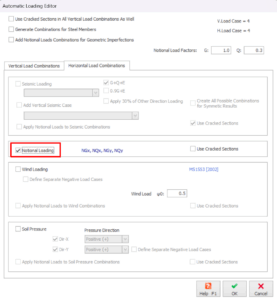
Create Notional Horizontal Load Cases and Combination To add Notional Load to the model, the Notional Load Cases and Load Combinations shall be generated: Analysis > Building Analysis > Pre-Analysis > Loading Combinations> Loading Generator > Horizontal Load Combinations, check the Notional Loading. For certain code of practice, example EuroCode, you can add notional horizontal load […]

Read More
Pre-Analysis

Load Combinations

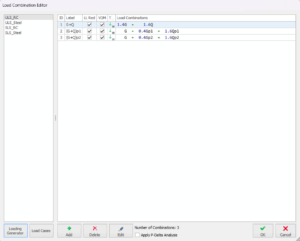
The load combinations to be used during the analysis of the building model can be specified by clicking the "Load Combinations" button which is located on the Pre-Analysis tab of the Building Analysis form. The figure below shows the Load Combination Editor Tab. P-Delta Analysis P-delta is one of many second-order effect. Check this option if […]

Read More
ProtaStructure Suite Overview

Modeling Steel Structures With Protastructure Suite 2024

In this webinar, one of our most experienced technical support engineers, Mr. Volkan Öğüt explained how to model a #steel structure with ProtaStructure Suite 2024 through a step-by-step live demonstration. Watching this video, you will explore the user interface of the ProtaStructure, find out essential new features, learn how to model, analyze, and design steel […]

Read More
ProtaStructure Suite Overview

Learn How To Accelerate Building Design And Detailing With Protastructure Suite 2025

At Prota, we’ve been shaping the future of structural BIM software for over 40 years. Our commitment to practical solutions and innovative design tools remains unmatched, and ProtaStructure 2025 is no exception. This latest release pushes the boundaries of what’s possible in building design, offering new modeling approaches, enhanced stability, and cutting-edge BIM integration. Starting from modeling […]

Read More
ProtaStructure Suite Overview

Structural Bim Design And Detailing With Protastructure Suite 2022

ProtaStructure Suite is an all-in-one structural engineering software providing a wide range of tools and features. This may sound a bit confusing at first. However, it's not! This webinar shows you how to take advantage of this complex software through a step-by-step demonstration. In this webinar, Prota Software Asia Manager Nigel Watts explains all the […]

Read More
ProtaStructure Suite Overview

Step By Step Structural Bim Design 19 2 2024

In this webinar, you will get an essential tutorial on the innovative tools and features of ProtaStructure! From modeling the structural elements, assigning the loads, and performing the FE floor analysis, to formwork detailing and steel connection design… You will witness a complete journey of a structural engineering project on ProtaStructure.  📌 Outline: –ProtaStructure Modeling […]

Read More
ProtaStructure Suite Overview

Protastructure Suite 2024 Revolutionary Structural Design Solution

Explore all the essential capabilities of the ProtaStructure Suite 2024 through a step-by-step tutorial! From modeling to detailing, an example project is being delivered in this webinar recording. You will learn how to generate axes, explore the user-friendly interface of the ProtaStructure, find out how to model and design RC and steel members, learn how […]

Read More