Web designing in a powerful way of just not an only professions. We have tendency to believe the idea that smart looking .

Manuals Page

409 result(s) found

Data and Model Export

Export Protasteel To Tekla Structures

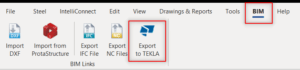
Steps to export a building model from ProtaSteel to Tekla Structures: First, download the TEKLA IO plug-in from our Prota Help Center, Downloads In ProtaSteel, go to 'BIM' tab – click 'Export to TEKLA'. Select "Quick Settings for Teklaio" and save directory of the export model. Run "Export" once ready. Run the Tekla IO plugin you […]
Read More
Data and Model Export

Creating Material Takeoff For Steel Structures

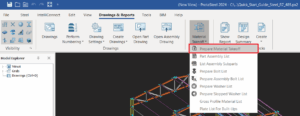
Quantity TakeOff ProtaSteel automatically creates material lists of the whole of the steel structure. "Material Lists" is located under the  "Drawing and Reports" tab.  Prepare Material Takeoff User can prepare the material list for (selected or all). This function will generate 4 Excel Spreadsheets at one time, which are: If you leave any object selected, a material […]

Read More
Data and Model Export

Data And Model Export Overview

ProtaSteel are versatile and flexible when comes to exporting information and model in order to communicate and collaborate with third party software/platform to enhance and smoothen user workflow. You may find export reference below: Creating Material TakeOff for Steel Structures Export ProtaSteel to Tekla Structures NC Profile Export

Read More
Data and Model Export

Export Steel Connections To Istatica

ProtaStructure is the all-in-one steel detailing and steel connection design software solution for engineers, fabricators, and drafting professionals to perform automated steel connection design and produce high-quality steel detail drawings. The structural model, once analyzed and designed in ProtaStructure, is transferred to ProtaSteel unidirectionally with accurate member positions and eccentricities and analysis results. Connection design, […]

Read More
Engineering Utilities

Rebar Anchorage And Lap Lengths

ProtaDetails is capable of calculating lap and anchorage lengths according to several building codes around the world. This document presents detailed lap and anchorage length calculations for different building codes with case studies. Reinforcement drawings produced by ProtaDetails, such as the beam elevation detail, inherently adopts the auto-calculated lap and anchorage lengths of the selected […]

Read More
Project Management

How To Restore A Backup Project

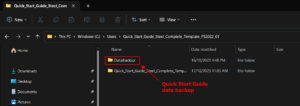
Automatic backups of the model is done in the background on an hourly basis without user intervention.  This backup is explained here : Backup Structural Model There will be situations that you want to restore the backup manually, example when the model is corrupted and the model cannot be opened.  This can be done by manually […]

Read More
Project Management

Project Management

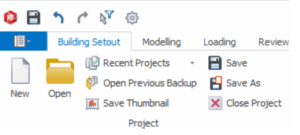
A structure modeled in ProtaStructure is saved with its related settings and parameters as a “Project”.  At any time you can go to Building Setout tab, the Project icons are shown as below. Once you have a project open, ProtaStructure’s automatic backup system can periodically make a copy of it to prevent accidental loss of data. Open projects can be […]

Read More
Project Management

Managing Project Model Via File Menu

Once a project is started, project management can be done via the the  “File” pull down at the top menu. In addition to “New Project” & “Open Project", the following are the available project tools : Save Project As  You can create a copy of the active project using the “Save Project As” option in […]

Read More
Pile Design

Lateral Analysis 29 4 2019

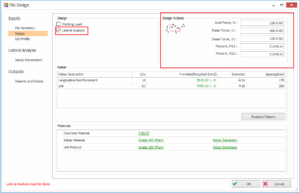
In the Pile Design calculation (ProtaDetails > Design Library), Lateral Analysis will analysis and design for pile combined axial and lateral shear or bending action.  Check the Lateral Analysis in the Pile Design > Design tab. The Lateral Analysis tabs will be visible on the left panel. Design Actions group box will be visible on […]

Read More
Pile Design

Pile Detailing

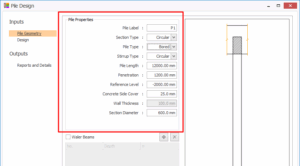
To generate the pile details, please follow steps below:- Go to Design Library (top menu) > Pile Design In Pile Properties , input all the parameters such as section type , pile type, pile length, etc. In Design tab, select concrete grade, rebar and link grades & diameters. Click OK  > Pick and insertion point on […]

Read More
Pile Design

Pile Working Load

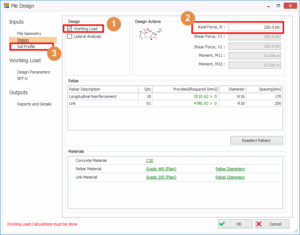
Working Load Pile Working Load will calculate the allowable pile structural compression and geotechnical capacities. Refer to following steps to calculate the pile working load: Check the Working Load in the Pile Design > Design tabThe Soil Profile and Working Load tabs will be visible on the left panel. Also Design Actions group box will be […]

Read More
ProtaStructure & ProtaDetails Videos

How To Detect Modeling Errors With Sparse Solver Protastructure

The presence of unsupported elements in the structural analysis models causes the formation of mechanisms and the inability to solve the equilibrium equations. Since singularity occurs in the stiffness matrix of the structure, its determinant becomes zero and the matrix cannot be reversed. Since the traditional Solver solves the equilibrium equation system with the 'Gauss-Jordan […]

Read More