Web designing in a powerful way of just not an only professions. We have tendency to believe the idea that smart looking .

Manuals Page

409 result(s) found

Structural Modelling

How To Model Slanting Inclined Beam

When a beam is modeled, it is by default created horizontally at the top of the active storey in view.   The elevation of the beam can be changed using the del z boxes for each end of the beam in the Beam Properties > 3D tab. Method 1 :  Input delZ manually in Beam […]
Read More
Structural Modelling

Temperature Loads

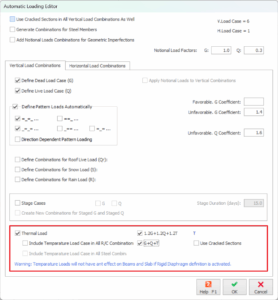
           Define Thermal Load User-defined temperature differences can be assigned to individual, or multiple columns, walls and beams in the model. An “Axial” temperature load causes the entire member to change in temperature by the specified amount. The value entered should be difference of temperature.  A “Gradient” temperature load is a […]

Read More
Structural Modelling

How To Model Slanting Inclined Column

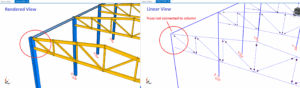
A column can only be inserted at the intersection of 2 axes which forms a node or joint. When a column is inserted, the top and bottom of the column will use the same node.  To model a slanting or inclined column, an additional node (intersection of axes) must be available. We will use a […]

Read More
Structural Modelling

Working With Planes

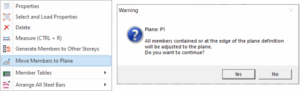
Plane Properties Plane Definition "Plane Properties" will be loaded when the "Plane Definition" option in the "Modelling" ribbon is selected. Planes are used to assist adjusting the levels of the members in Z direction. Plane definition is a particularly efficient way of modeling structural members such as sloping slabs (e.g. ramps) that are not parallel […]

Read More
Structural Modelling

Castellated Beam

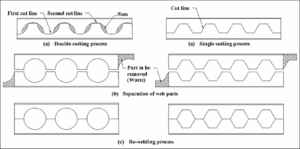
A castellated beam is created by slicing an I-beam longitudinally along its web in a specific pattern. The goal is to separate and then rejoin the beam with a deeper web. These beams are categorized based on the shape of the openings in the web section, with common shapes including hexagonal, circular (also known as […]

Read More
Structural Modelling

Working With Columns

Defining a New Column Before inserting a column member its reference axes must be defined.  Column can only be inserted on insertion point defined by intersection of 2 axes.  To define a new column member (Concrete/Steel):  Display the storey level in the drawing area which will contain the top of the column. To create concrete […]

Read More
Structural Modelling

Modeling Steel Structures With Protastructure 2022

ProtaStructure provides a wide range of easy-to-use tools for modelling steel and RC members. Under the "Modelling" tab  of the RIBBON menu, you'll find various commands to model both concrete and steel members. In this webinar, the ones for the steel members are explained in detail. Also, this webinar provides you with a step-by-step demonstration […]

Read More
Structural Modelling

How To Model A Continuous Beam With Varying Depth

Modelling continuous beams with different depths can be done with reference to this video. The summary of steps are : Model axes to be used as insertion points for the beams. Model separate beams using the e-z (h-top) property to adjust the elevation of the beams Remove the cantilever marks by setting both ends as […]

Read More
Structural Modelling

Working With Purlins

Define a New Purlins Before inserting purlins, trusses/beams/ steel frame members must be defined.  To define purlins:  Click on the "Purlin" button from toolbar or you can use command line at right bottom corner. There are two purlin insertion methods; Insert Using Two Members or Insert Using Multiple Members.   To Insert Using Two Members, select the first […]

Read More
Structural Modelling

Working With Walls

Defining a New Wall Before inserting a wall member its reference axes must be defined.   Walls are defined by two axis intersection points (insertion points)  defining the start "I" and end "J" of the member. Hence for wall, 3 axes are needed for create the 2 insertion points.  To define a new wall member: Display […]

Read More
Structural Modelling

Yield Line And Fe Load Decomposition With Example

For your best understanding to this topic, it is best to refer and relate to  Modelling, Analysis & Design Flowchart before proceeding with this article. There are two methods to calculate concrete slab loads onto supporting reinforced concrete beams :  1. Derive Beam Loads using default “Yield Line” When slab and beams are modelled, the slab […]

Read More
Structural Modelling

Working With Steel Frame Ps 2022

The “Frame Member” option enables users to model steel beams, composite beams, girts, purlins, braces and frame groups (to model multiple frames). This allows users flexibility to model steel structures anywhere in the model. Frame member sections can be rotated in any orientation, and local offsets can be assigned without compromising the analytical model. Users can […]

Read More