Web designing in a powerful way of just not an only professions. We have tendency to believe the idea that smart looking .

Manuals Page

409 result(s) found

Structural Modelling

How To Merge Models Pss2019

Here are some of the great topics that will be highlighted during the webinar: Merging two structural models Raft foundation modeling Raft foundation FE analysis Raft foundation rebar selection Host: Caglar CUBUKCU Civil Engineer / Test Engineer, Prota Software

Read More
Structural Modelling

How To Raise Or Drop A Beam In Elevation

By default, the top of the beam is always assumed to be atop of the storey in which  the beam is modelled.  To change the elevation of the beam, i.e. to lower or raise it from default, there are 2 methods : Use e-z input in the Beam Properties > General tab   Use delZ input […]

Read More
Structural Modelling

How To Model A Transfer Slab

Creating Transfer Slab Model A transfer slab is defined as a slab that is directly supporting discontinuous columns and walls directly, without beams.  The steps of modelling a transfer plate is similar to that of modelling a flat slab system: Model the supporting column and walls in transfer storey Model the transfer slabs in the […]

Read More
User Interface

Views

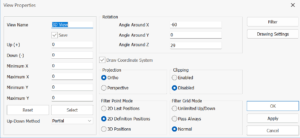
In ProtaSteel, windows in which the structure is displayed are called Views. View is a viewport that displays a part or the whole of the model. When a new project is started, a general 3D view (a similar View Window is shown above) is created automatically. 2D views are a special case of 3D views and […]

Read More
User Interface

Shortcut Key

Following table displays the keyboard shortcuts used by the program. Here, context is the part and state of the program within which the shortcut key is valid. Transparent field indicates whether shortcut key combination works concurrently with the current active command (such as Profile element creation) or not. Alternatively, can download these shortcut keys in […]

Read More
User Interface

User Interface Overview

In user interface, there are several topics to be explain in detail here: User Interface Views Toolbars Menu Shortcut Keys

Read More
User Interface

Toolbars Psteel 2022

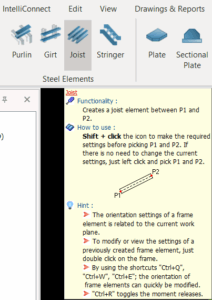
The top menu contains various ribbons that group the relevant toolbars to most frequently used commands & functions. To display the tooltip of a button, hover the mouse cursor over that button. Read the information carefully as it contains detail instruction on how to use the function.  Most toolbar buttons, like the Purlin, Sag Rod command, […]

Read More
User Interface

User Interface Psteel 2022

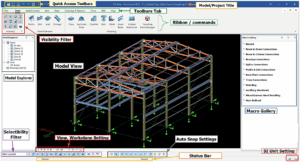
The various components of ProtaSteel user interface are as shown below: The graphical user interface is composed of major parts as summarized as below: Model Explorer Model explorer is used to perform common tasks like opening and closing views, creating grids & loading the Drawing module. Model Explorer window can be docked to any side of the main […]

Read More
ProtaDetails

Protadetails Capabilities And Tips

Are you interested to learn how to create your own custom title blocks? Customize drawings with your own title blocks with auto referencing including all project and sheet information. Learn more about the strong CAD capabilities of ProtaDetails. See how easy it is to work with intelligent rebars to decorate any custom formwork. ProtaDetails 2019 […]

Read More
ProtaDetails

From Design To Drawing Simplifying The Construction Drawing Process

ProtaDetails is here to boost your efficiency! In this webinar, our partner in Nigeria, Engr. Iduh Ofikwu showcased all the industry-leading capabilities of the ProtaDetails 2024. By watching this session, you will explore how to accelerate the design process of RC members and how to automate RC detailing. Mr. Ofikwu provided a step-by-step tutorial for […]

Read More
Foundation Modelling and Design

Pile Caps

Before defining a Pile Cap :  The building model must be completed and analysed, so that the column axial loads and moments are determined.  The foundation storey (Storey 0) must be set as the current storey.  In order to determine concrete and steel grades that will be used in the Pad Footing Design, you may go […]

Read More
Foundation Modelling and Design

Pad Footing

Before defining a Pad Footing: The building model must be completed and analysed, so that the column axial loads and moments are determined. The foundation storey 0 (ST: 0) must be set as the current storey. In order to determine concrete and steel grades that will be used in the Pad Footing Design, you may […]

Read More