Web designing in a powerful way of just not an only professions. We have tendency to believe the idea that smart looking .

Manuals Page

409 result(s) found

Foundation Modelling and Design

Design Pile Cap Pad Footing For Service Load Unfactored Load

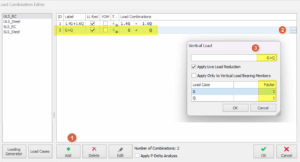
The example below shows the step to design pile cap for service load (unfactored load). It is also applicable in designing pad footing as the steps are similar. First, manually create a unfactored load combination combination in Load Combination Editor dialog (example shown below) After running the Building Analysis, select a column in Storey 0 and click […]
Read More
Foundation Modelling and Design

How To Model A Foundation At Different Level Or Storey

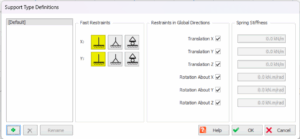
What is a default support? Default Supports Method The support provided by default is dependent upon the storey level at which the column or wall stops. For columns and walls that stop at ST: 0 (i.e. the foundation) — Default = Fully Fixed Support (Show in below figure, boxed in red) For columns and walls […]

Read More
Foundation Modelling and Design

Stepped Foundations And Elevator Pits With Basement Slabs And Walls

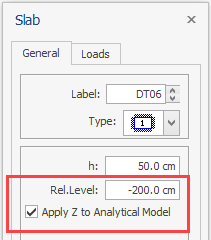
You can model and analyze foundations at different elevations and elevator pits with foundation slabs and walls.  1. Insert slabs in foundation storey as usual. 2. Enter the relative elevation difference in the “Rel. Level” field on the Slab Properties window.  Positive values will move the slab upwards.  3. To consider the “Rel. Level” parameter in […]

Read More
Foundation Modelling and Design

Strip Footing

For a strip footing to be defined under a series of columns/walls, foundation beams must have been defined beforehand between the columns/walls. ProtaStructure performs the strip footing calculations for all load combinations and draws moment and shear diagrams as a combination envelope. Besides these, calculations are also performed based on coefficient of subgrade reaction interval. […]

Read More
Welcome to ProtaSteel Help

Program And Project Directory

Program Directory The ProtaSteel program is automatically installed with the ProtaStructure suite setup. The directory of default installation is currently "C:Program Files (x86)ProtaProtaStructureXXXXProtaSteel" The "db" sub-directory will hold at least 2 files containing the "Profile" (PROFILES.GDB) and "Bolts" (BOLTS.GDB) databases. These databases can be accessed and modified from within ProtaSteel (hence do not manually edit or […]

Read More
Welcome to ProtaSteel Help

Introduction 22 10 2018

ProtaSteel is a steel detailing module that works seamlessly with ProtaStructure.  It is included and automatically installed with the main ProtaStructure installation setup. The main steel model must be created in ProtaStructure, i.e. steel beams and columns, trusses, girts, brace & purlins. ProtaSteel must be started from within ProtaStructure, i.e. it cannot be launched from […]

Read More
Settings And Parameters

Project Settings Ps 2022

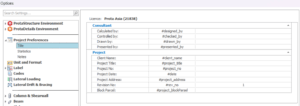
Project Preferences Title This page controls the project information settings.  Statistics This page provides the summary of members used in the project.  Notes This page allows user to take note for the project.  Unit and Format This page controls the project unit settings.  In the table : Unit : To select preferred unit. Format Control : To adjust the format […]

Read More
Settings And Parameters

Beam Design Settings Ps2022

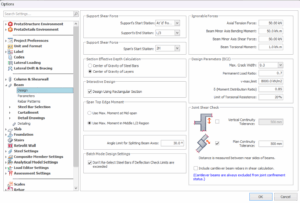
General Beam design setting must be preset correctly before starting any beam design. This is to ensure the beams are correctly designed based on the project criteria & user preferences. To access the Beam Design Setting, user can: Go to "Building Setout" tab > "Settings Center" > "Beam", or Click on “Setting and Parameters” in […]

Read More
Settings And Parameters

Slab Design Settings Ps2022

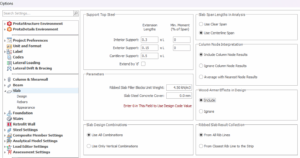
General Slab design setting is important to preset before starting to design any slabs. Presetting these design parameters can save users significant amount of time. This is to ensure the slabs are correctly designed based on the project criteria. To access the Slab Design Setting, user can go to "Building Setout" tab > "Settings Center" > "Slab". Design Basic design […]

Read More
Settings And Parameters

Angle Limit For Splitting Beam Axes

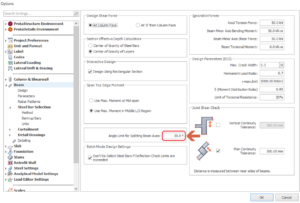
Angle Limit for Splitting Beam Axes Allows user to set the angle limit at which connected beam axes with different orientation will be split (else combined) Only beams axes exceeding the set angle will be split to separate design & detailing axes. This setting is under ‘Settings > Beam > Angle Limit for Splitting Beam Axes' […]

Read More
Settings And Parameters

Protastructure Environment

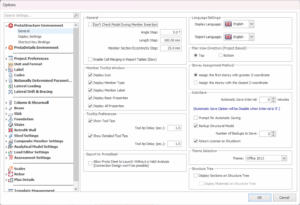
Item based settings can be modified in this form. These settings may be different for another ProtaStructure installation on a different computer. General General settings of the ProtaStructure can be controlled in the General page under ProtaStructure Environment. General : Don’t Check Model During Member Insertion : To  check overlapping between different member type (except column) during insertion. […]

Read More
Settings And Parameters

Column Design Settings Ps2022

General Column and shearwall design setting is important to preset before starting to design any columns/walls. By presetting these design parameters can save a significant amount of time for user compare to user who set after designing columns/walls. This is to ensure the columns/walls are correctly designed based on the project criteria. To access the […]

Read More