

Export Protasteel To Tekla Structures
Steps to export a building model from ProtaSteel to Tekla Structures:
- First, download the TEKLA IO plug-in from our Prota Help Center, Downloads
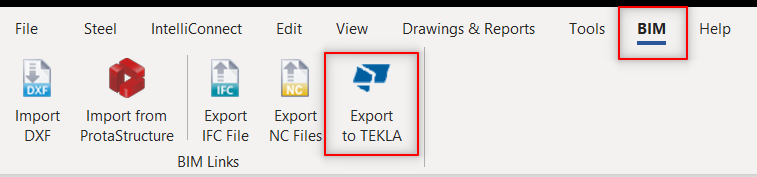
- In ProtaSteel, go to 'BIM' tab – click 'Export to TEKLA'.
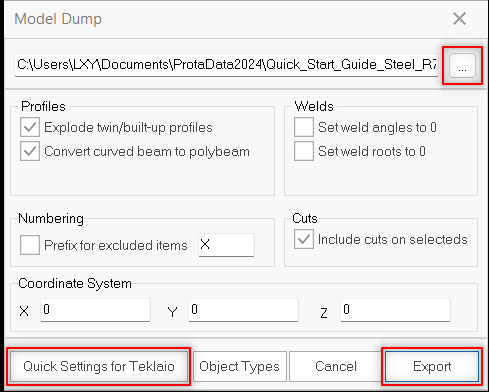
- Select "Quick Settings for Teklaio" and save directory of the export model. Run "Export" once ready.
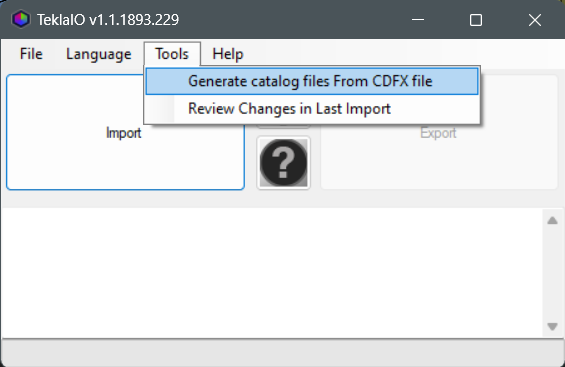
- Run the Tekla IO plugin you downloaded. From the "Tools" top menu select the "generate catalog files" option. Select the CDFX file exported from ProtaSteel. Files with ".lis" extension will be created automatically.
- If you having error as below, you may got to the setting to change the TeklaStructures version setting.
- Open a blank worksheet in Tekla Structures.
- Select "Profile" > "Profile Catalog" from the Modeling upper menu.
- Select the "Import…" option at the bottom of the page that opens. Select the "<ProjectName>_Profiles.lis" extension file you created with Tekla IO.
- Select all the elements in the page that opens and mark the "replace" option. Thus, the elements in ProtaSteel and Tekla Structures program will be synchronized.
- Select "Continue" to exit.
- Back to the "Tekla IO" plugin again, and select the "import" command. Thus, you will transfer the model to Tekla Structures.
- Assembly and part numbering made in ProtaSteel will be transferred to Tekla Structures without any changes.