

Nc Profile Export
Profile elements which has calculated in ProtaSteel, can be exported as NC files to sent to CNC machine.
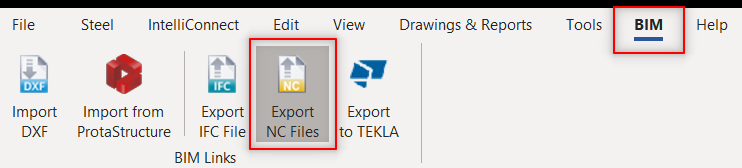
This tool is located at BIM Tab -> Export -> Export NC Files.

Numbering need to be successfully completed for NC export to run.
To export elements, first you should add them to selection. Then you should execute “Export NC Files” tool. To create NC files you should click the “Run" button. If an error occurs it will be reported when the export session is completed..
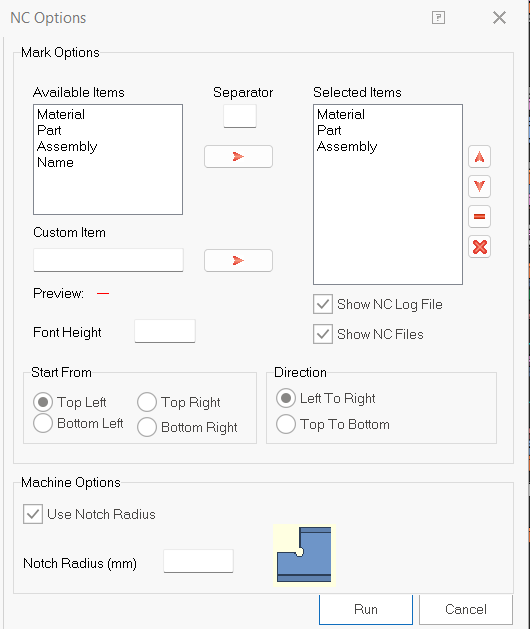
”Mark Options’‘ defines the info that will be written on the plate or profile element.
- If you like to write Part info, you should select ‘Part’ item then click the
icon. You can also add specific texts to the info list by using “Custom Item” field.
- You can arrange the order of the selected items by clicking
or
buttons.
- To delete an item click
button. To reset all click
button.
“Font Height” defines the height of the font in mm.
”Notch Radius‘‘ is used for concave corners. To turn it off enter it as 0.

NC files are created under the ExportsNCPlates or ExportsNCProfiles folders at the model directory.
Unsupported Cases:
- Pipe profiles are not supported. You can use Fish Mouth tool to obtain 1:1 dxf file.
- Folded plates are not supported.