Protastructure Common Installation Issue
Before installing of ProtaStructure, ensure the following your computer meet the minimum specification stated in this article : Hardware & System Requirements for ProtaStructure Suite
To ensure ProtaStructure runs optimally and effectively, we highly recommend that you aim for the higher recommended specification.
Common Problem 1 : Installation fails to complete with message "There is an error during the Windows feature configuration process. Your original configuration will be restored"
Please ensure and perform the following :
1. Windows system is up to date. Only Windows 10 & 11 are supported. Windows 7 is not supported.
- Refer Microsoft website on how to update your windows : Get the latest Windows update
2. You must install using Administrator account.
- Refer Microsoft website : How do I log on as an administrator?
3. Stop all 3rd Party AntiVirus program and AntiMalware program
- Some of the more aggressive Antivirus or AntiMalware program will interfere with installation, example Avast, Avira, AVG
- Generally, Microsoft Defender Antivirus is sufficient to protect the device – it is free and comes with Windows.
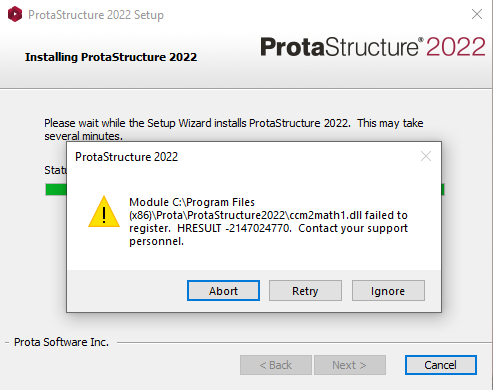
Common Problem 2 : ".dll failed to register. HERSULT -2147024770. Contact your support personnel."
This issue happens when the Microsoft Visual C++ Redistributable in the device has not correctly installed, damaged or deleted by AntiVirus program.
Solution
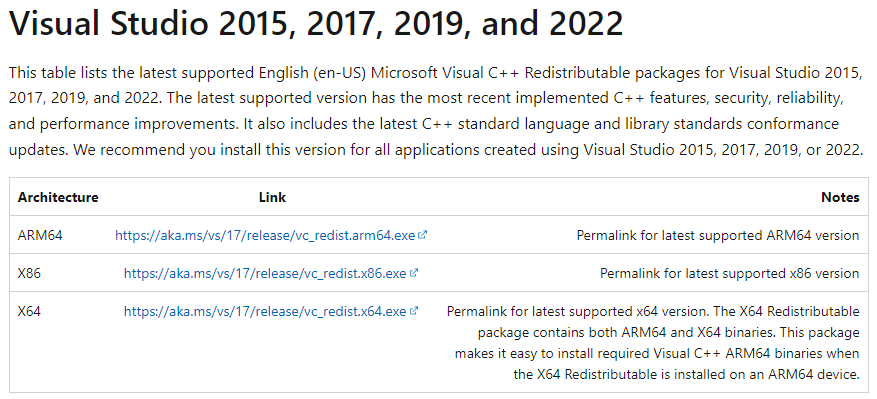
To resolve this issue, please kindly install the latest Microsoft Visual C++ Redistributable packages via official microsoft download link : Microsoft Visual C++ Redistributable latest supported downloads
Select and download either one that matches your device specification. (e.g. "X64" (64 bit system) is the most common architecture used in Windows device nowadays.)